
Whether you're looking to update your subscription, cancel your plan, or request a refund, this guide walks you through everything you need to know about managing your ReadTheory Premium subscription.
📑 Table of Contents
Auto-Renewal Policy
When you sign up for a ReadTheory Premium individual subscription through our pricing page, your plan is set to auto-renew, either monthly or annually, depending on your selected payment option.
-
You’ll receive an invoice email each time your subscription is renewed.
-
You can check your renewal date or billing cycle any time by accessing your subscription settings (see instructions below).
- You will not receive a notification before the subscription is set to renew, only once it has successfully renewed.
How to View, Update, or Cancel Your Subscription
Whether you're checking your plan, updating payment info, or ready to cancel, everything you need is in one place. Here's how to manage your ReadTheory Premium subscription:
-
Log in to your ReadTheory account using your username and password.
(❗Please note that billing information is not available when signing in through Google SSO).
-
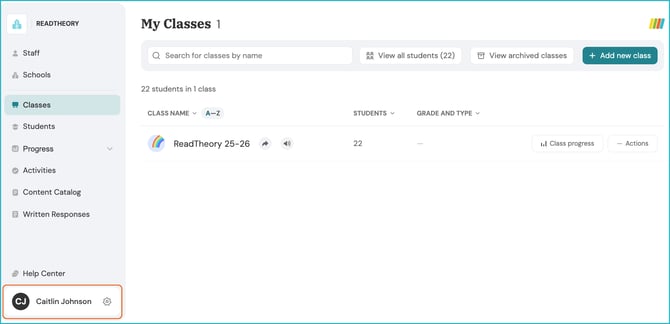
Select your name and the gear icon in the bottom-left corner. This will take you to your Account Settings.
-
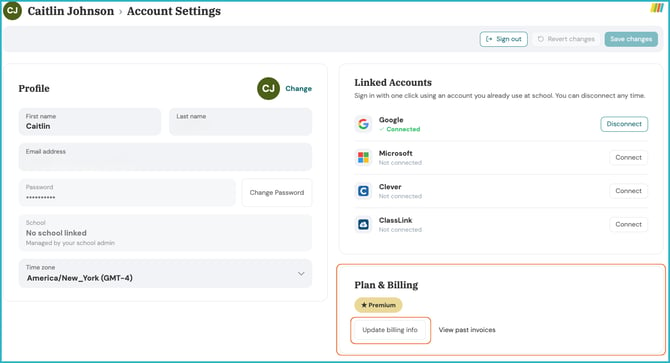
On the Account Settings page, underneath Plan & Billing, select Update Billing Info.
-
You'll be taken to a page where you can:
-
View your current plan and renewal date
-
Update payment details
-
Cancel your subscription
-
📌 Note for SSO users: If you sign in with Google, Microsoft, Clever, or Classlink, you might not see the billing option. Simply log out and sign back in using your ReadTheory username and password to access billing settings.
📋 Want to tell us why you’re canceling? Fill out our 3-question survey here: Feedback Survey
Cancellation & Refund Policy
🕐 Canceling from your account after the renewal date: If you cancel through your billing settings after your subscription has renewed, it will not cancel immediately. Instead, your cancellation is set to take effect at the end of your current renewal period, and your subscription will not renew after that.
🚫 Need it canceled right away? Email support@readtheory.org, and we can cancel your subscription immediately instead of waiting for the current period to end.
💵 Refunds: If you'd like a refund, reach out to support@readtheory.org within the window that applies to your plan:
- Annual subscriptions: within 30 days of your renewal date
- Monthly subscriptions: within 7 days of your renewal date
Requests made after these windows are not eligible for a refund.
⏸️ Want to pause instead of cancel? Pausing is available for monthly subscriptions. Email support@readtheory.org with your account information and the specific dates you'd like your subscription paused.
🏫For school or district plans, please reach out to your assigned account manager to discuss cancellation, pausing, or refunds.
Who do I contact about billing or renewals?
For any billing, renewal, cancellation, pause, or refund questions on an individual teacher plan, email support@readtheory.org.
For school plans, reach out to your assigned account manager.
Related Articles & Resources
Bring ReadTheory to Your School or District
How to Edit Your Account Information
Connect, Grow, and Inspire: Explore ReadTheory’s Educator Communities!
Have questions? We’re here to help. Reach out anytime at support@readtheory.org.