
A ReadTheory classroom allows teachers to organize and manage groups of students from one central teacher account. You can assign reading activities, track progress, and streamline your classroom reading goals, quickly and easily.
📑 Table of Contents
How to Create a Classroom
Setting up a classroom takes just a few minutes. Here's how:
- From the Classes tab, select Add New Class in the right corner.

- Fill out the information for your class.
- Select Create Class at the bottom of the form.
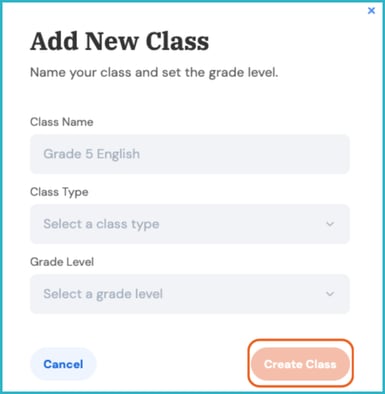
Your new classroom will now appear in your dashboard! 🎉
Editing Class Settings
You can revise your class's settings any time from the gear icon in the top-right corner of the class page, labeled Class Settings. From here, you can turn features on or off for your students.
- Allow students to see Grade/Lexile level information: Lets students see the grade/Lexile level for the passages they're currently working on.
- (Premium) Restrict auto-assigned passages by grade level: Lets you set a maximum passage grade level for students in the class. Students will only receive passages at or below the selected grade level, regardless of their reading level or performance.
- Read Aloud: Allows students to have access to a feature that reads passages aloud to students.
- Adding a Co-Teacher: You can invite additional teachers to the class to help. No more than three teachers can be added as co-teachers.
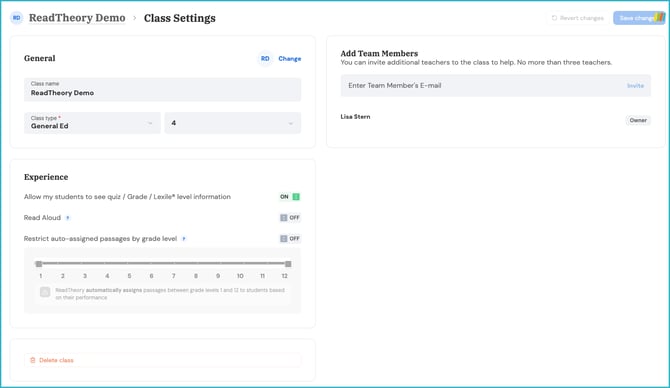
📌 Note: Some features are reserved for Premium users.
Related Articles & Resources
How to Create a Student Account
Have questions? We're here to help. Reach out anytime at support@readtheory.org.