
Login cards give teachers a permanent way to control how students log in to their class. This guide covers what login cards are, how students use them to sign in, and how to view or reset them.
📑 Table of Contents
- What Are Login Cards?
- Getting Students Signed In
- Viewing or Printing Login Cards
- Resetting a Student's Password
- Related Articles & Resources
What Are Login Cards?
Login cards are unique to each class and give teachers a permanent way to control how their students log in. Each student's card includes the username and password they need to sign in.
A few important things to know:
- Login cards are no longer emailed to teachers. They're always available directly from the class page, so you can pull them up any time you need them.
- The password on a login card will always work, even if the student has since changed their own password, unless the student is dropped from the class, or you rotate the class's login cards.
- Old login cards remain valid. This applies to login cards saved before this feature was introduced, too. Since each card includes the student's password, an older printed or exported card will still work to sign the student in, as long as it hasn't been rotated out.
Getting Students Signed In
- Create student accounts from within the class page. See Adding Students and Creating Student Accounts for instructions.
- Once accounts are created, their login cards become viewable from your class page. You can print these and distribute them to your students.
- How a student signs in depends on how their account was created: if it was set up with Single Sign-On, they'll sign in that way; otherwise, they'll sign in using the credentials on their login card. Both will provide access to student accounts.
Viewing or Printing Login Cards
- Click on the class you wish to view credentials for.
- In the top-right of the page, select View Login Cards.
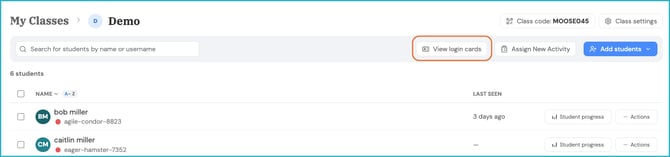
This will take you to the login cards for that class, ready to view or share with students as needed. If you'd like a physical copy, select Print from the login cards page.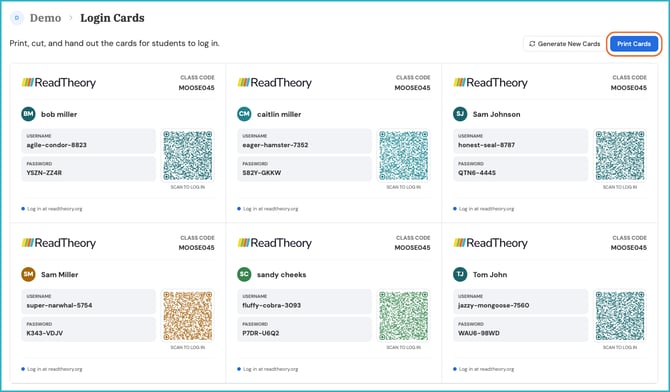
Students can sign in to the platform with the provided credentials or scan the QR code.
Teachers have the option to regenerate login cards, which will reset the current student passwords. 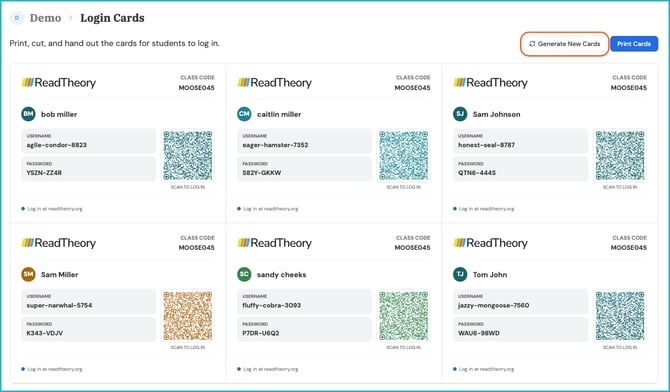
Resetting a Student's Password
You can manually reset a student's password to one of your choice at any time. This does not update the password shown on the student's login card; the card will still display the original password.
❗The password that was noted during reset and the password viewable on the login card will be different, but both passwords will grant access.
📌 Note: The viewable login cards help teachers maintain control over access to student accounts. If you'd like a clean set of new passwords for the whole class, you can rotate the class's login cards instead of resetting students individually.
Related Articles & Resources
Adding Students and Creating Student Accounts
Have questions? We're here to help. Reach out anytime at support@readtheory.org.