---
title: Locating and Analyzing Benchmark (Pretest) Scores
description: Learn how the ReadTheory pretest works to determine a student's reading level and how to locate scores in your teacher dashboard.
---
[Skip to content](https://help.readtheory.org/locating-and-analyzing-pretest-scores#main-content)
English
Show submenu for translations
[](https://readtheory.org/)
Open main navigation
Close main navigation
- English
Show submenu for translations
How can we help you?
- There are no suggestions because the search field is empty.
1. [ReadTheory Knowledge Base](https://help.readtheory.org/?hsLang=en)
2. [Reporting & Benchmarks](https://help.readtheory.org/reporting-benchmarks?hsLang=en)
# Locating and Analyzing Benchmark (Pretest) Scores
## What is the benchmark? 📈
The benchmark, formerly known as the pretest, is a short, adaptive quiz that helps determine each student’s initial reading level. It ensures students start at the right difficulty by adjusting in real time based on their answers, making sure they receive reading passages that match their current skill level.
### 📑 **Table of Contents**
- [How Does the Benchmark Work?](https://help.readtheory.org/locating-and-analyzing-pretest-scores#how)
- [Where Can I Find The Benchmark Scores?](https://help.readtheory.org/locating-and-analyzing-pretest-scores#where)
- [Grade Level Progression Report](https://help.readtheory.org/locating-and-analyzing-pretest-scores#grade-level-progression)
- [Lexile Level Report](https://help.readtheory.org/locating-and-analyzing-pretest-scores#lexile)
- [Benchmark Test Report](https://help.readtheory.org/locating-and-analyzing-pretest-scores#benchmark)
- [How to Check if a Student Has Completed the Benchmark](https://help.readtheory.org/locating-and-analyzing-pretest-scores#how-to-check)
- [Related Articles & Resources](https://help.readtheory.org/locating-and-analyzing-pretest-scores#related)
---
### How Does The Benchmark Work?
Every student is **automatically** given the benchmark the first time they log into their account. Here's how it functions:
- The benchmark starts at a **3rd-grade** level by default.
- If the questions are too difficult, the system will move the student down to a lower level.
- If the questions are too easy, the system will move the student up to a higher level.
- The benchmark is adaptive, meaning the number of questions varies based on the student’s responses.
- Most students complete the benchmark in 20 minutes or less.
- Once completed, the student is assigned a grade-level score and begins receiving tailored reading practice based on that result.
- The benchmark must be completed in **one sitting**. If the student logs out before finishing, they will need to start over the next time they log in.
⚠️ **Important:** Students should complete the benchmark independently. Help from a teacher or parent may lead to inaccurate placement and misaligned quiz levels.
---
### Where Can I Find the Benchmark Scores?
There are **three main places to find benchmark data**, each showing the same underlying scores from a slightly different angle:
- **Grade Level Progression:** Shows a student's benchmark score in grade-level terms, plotted over time. Use this to see how a student's reading level has moved since their first benchmark. **We recommend this option for a quick snapshot of where a student is starting based on their pretest.**
- **Lexile Progression:** Shows the same benchmark data using Lexile measures instead of grade level. Use this if your school or district tracks reading level by Lexile score.
- **Benchmark Test:** Shows every benchmark a student has taken, including their initial benchmark and any retakes, so you can compare scores side by side over time. This will show data for a specific benchmark test.
---
### Grade Level Progression
This report shows a student's benchmark score in grade-level terms, plotted over time. Use this to see how a student's reading level has moved since their first benchmark. **This is the best report if you want to see what grade level a student will be starting on.**
1. Log in to your teacher account and go to your **Progress** tab.
2. Under **Class Reports**, select **Grade Level Progression.**
3. Choose the class you want to view using the dropdown menu.
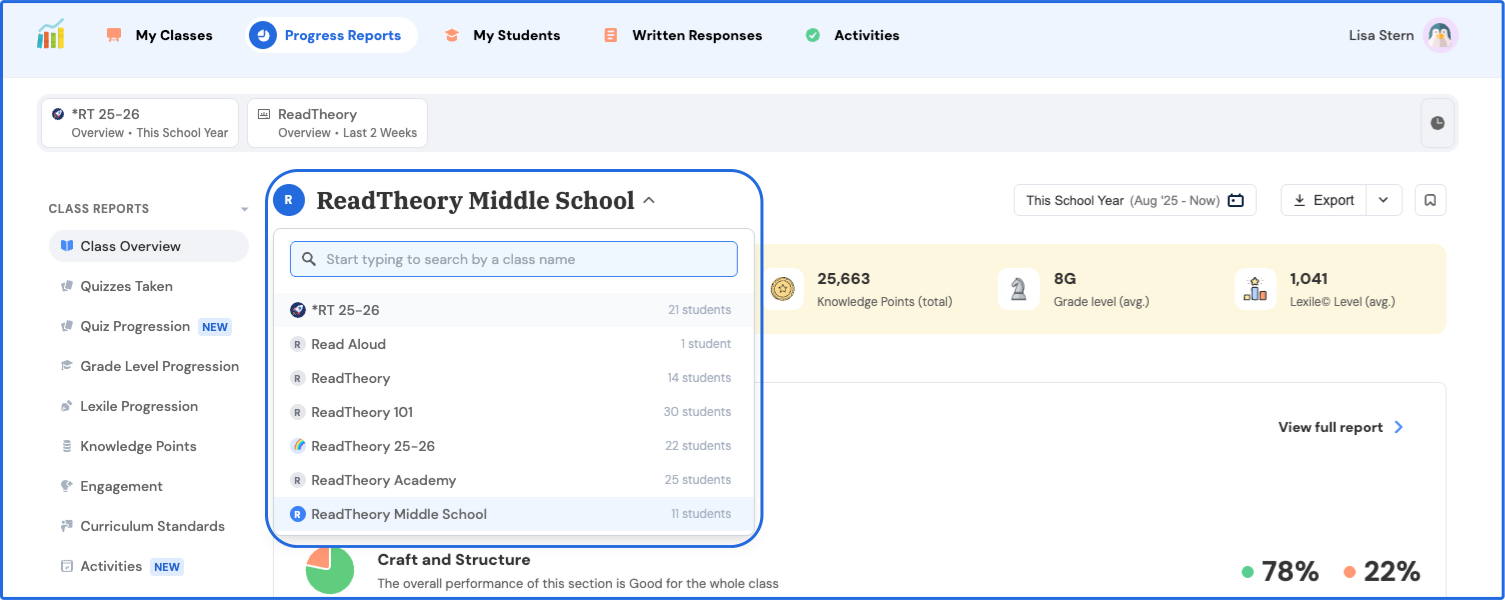
4. Look for the **orange dots**. These indicate the benchmark score. Hover over a student’s data point to view their score.
.svg)
5. You can also switch to **Table View** to see all students’ pretest scores at once.
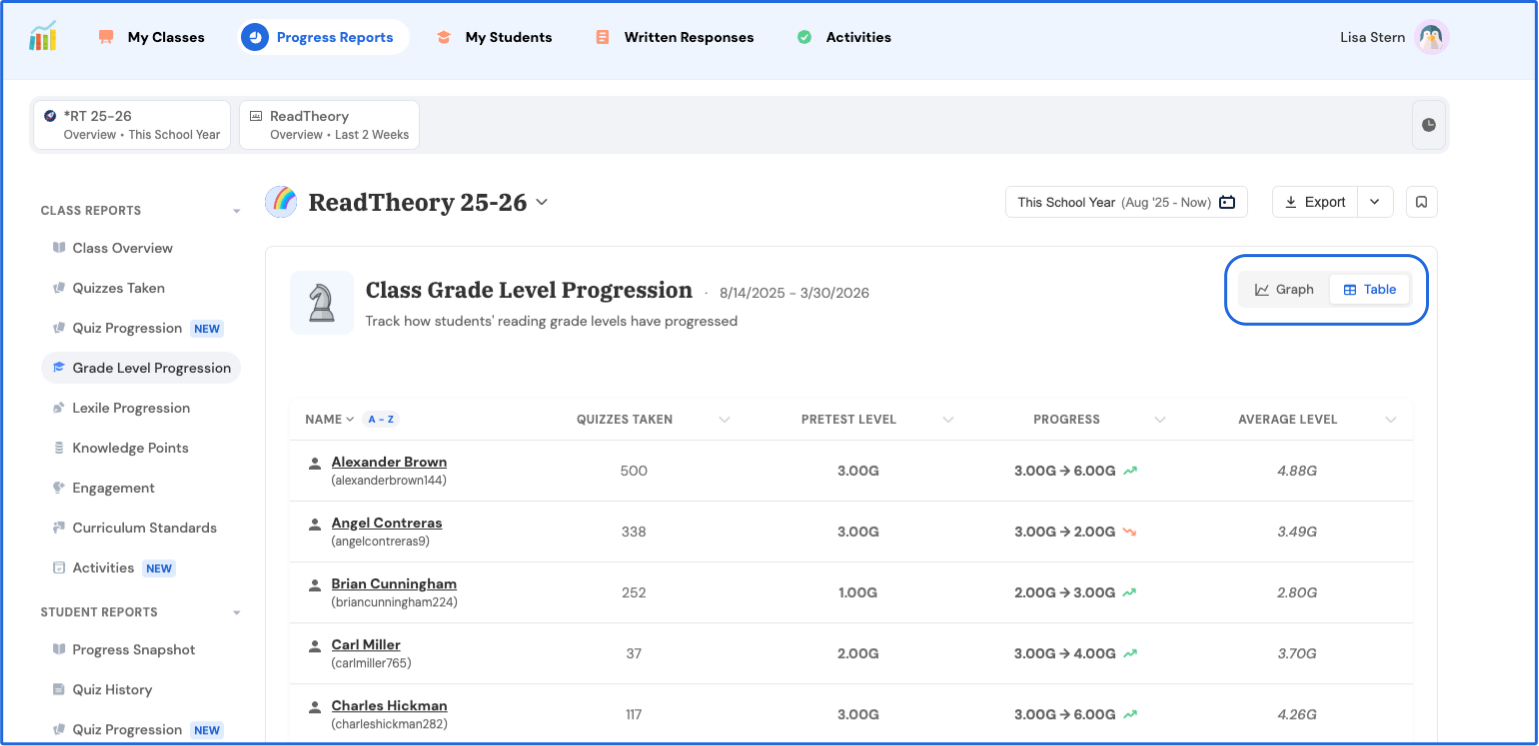
⚠️ **Note:** Benchmark scores will not appear until a student has completed at least one additional quiz after finishing the pretest.
---
### Lexile Progression Report
This report shows the same benchmark data using Lexile measures instead of grade level. Use this if your school or district tracks reading level by Lexile score.
1\. Log in to your teacher account and go to your **Progress** tab.
2\. Under **Class Reports,** select **Lexile Progression.**
2\. Choose the class you want to view using the dropdown menu.

4\. Look for the **orange dots.** These indicate the benchmark scores. Hover over a student’s data point to view their benchmark Lexile score. 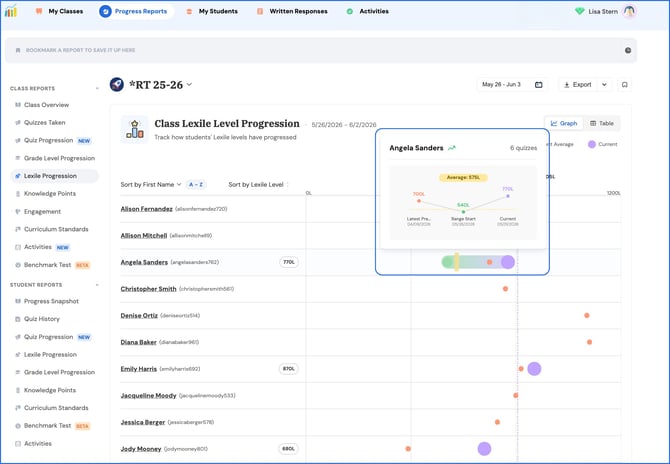
5\. You can also switch to **Table View** to see all students’ benchmark Lexile scores at once. 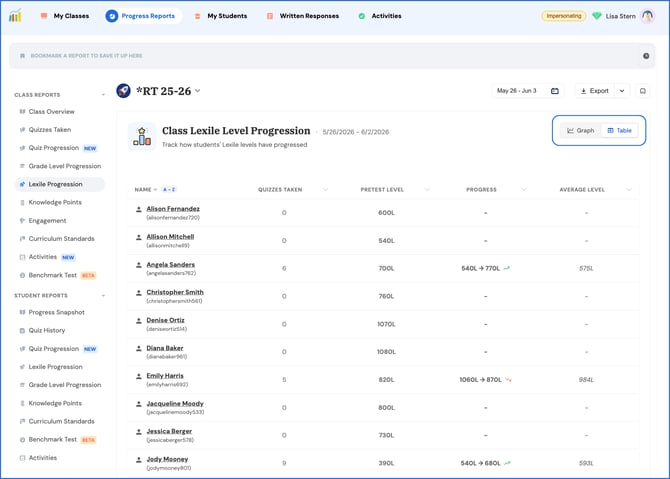
⚠️ **Note:** Benchmark scores will not appear until a student has completed at least one additional quiz after finishing the pretest.
---
### Benchmark Report
Shows every benchmark a student has taken, including their initial benchmark and any retakes, so you can compare scores side by side over time. If you assigned a Benchmark to your class, then this is where the report will go.
This report is helpful in seeing specifically where a student placed on one specific benchmark test.
1\. Log in to your teacher account and go to your **Progress** tab.
2\. Choose **Benchmark Test** under **Class Reports**.
3\. Choose the class you want to view using the dropdown menu.
4\. **Filter** results based on **Latest Benchmark** or other assigned Benchmark tests. 
4\. **Click on an individual student** to go to their student Benchmark Test data report.
---
### How to Check if a Student Has Completed the Benchmark
Before looking for scores in your reports, you can quickly check a student's benchmark status from **My Students**:
1. Go to the **My Students** tab.
2. Look for a colored circlenext to the student's name. Hover over their name for more details.
1. A **green circle** means they've completed the benchmark. .png?width=670&height=197&name=complete%20benchmark%20(1).png)
2. A **red circle** means the student has not yet completed the benchmark. 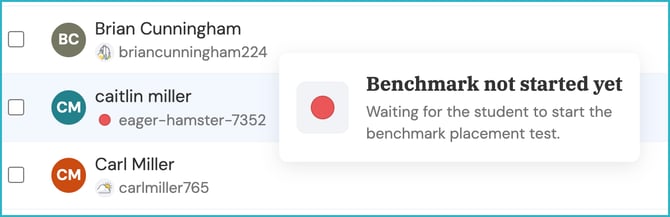
An **Achievement Badge** next to a student's name indicates that they have completed the pretest and additional quizzes. The badge indicates a student's Knowledge Point status. For more information, view [What are Knowledge Points?](https://help.readtheory.org/what-are-knowledge-points?hsLang=en)
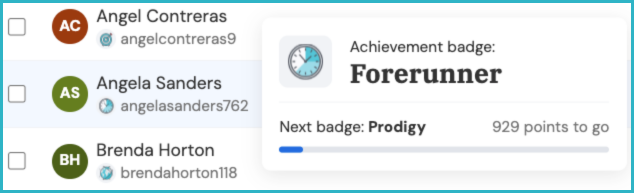
You can also see the student's **last login date** under the **Last Seen** column. This helps you confirm whether, and when, the student has signed in at all. 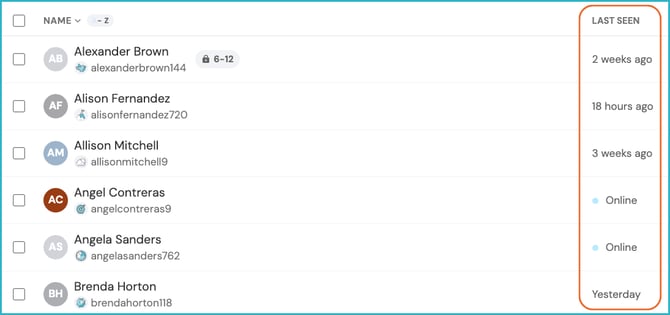
**📌 Note:** If the benchmark is complete but data still isn't showing in your reports, the student likely hasn't finished an additional quiz yet. Once they complete one more quiz after the benchmark, their data will begin to populate. See Related Article: [Why Isn't My Student's Data Appearing?](https://help.readtheory.org/student-data-not-appearing?hsLang=en)
### Related Articles & Resources
[Why Isn't My Student's Data Appearing?](https://help.readtheory.org/student-data-not-appearing?hsLang=en)
[Assigning Activities](https://help.readtheory.org/activities?hsLang=en)
[Adding Students and Creating Student Accounts](https://help.readtheory.org/adding-students-and-creating-student-accounts?hsLang=en)
[How to Create a Student Account](https://help.readtheory.org/faq/how-to-create-a-student-account?hsLang=en)
[How to View Student Progress](https://help.readtheory.org/progress-reports?hsLang=en)
[Connect, Grow, and Inspire: Explore ReadTheory’s Educator Communities!](https://help.readtheory.org/teachers-lounge?hsLang=en)
---
Have questions? We’re here to help. Reach out anytime at [support@readtheory.org](mailto:support@readtheory.org).
- [Getting Started](https://help.readtheory.org/getting-started?hsLang=en)
- [Using ReadTheory](https://help.readtheory.org/using-readtheory?hsLang=en)
- [Account & Access](https://help.readtheory.org/account-access?hsLang=en)
- [Premium, Billing & Subscriptions](https://help.readtheory.org/premium-billing-subscriptions?hsLang=en)
- [Troubleshooting](https://help.readtheory.org/troubleshooting?hsLang=en)
- [FAQs](https://help.readtheory.org/faqs?hsLang=en)
- [Reporting & Benchmarks](https://help.readtheory.org/reporting-benchmarks?hsLang=en)
- [Administrators](https://help.readtheory.org/administrators?hsLang=en)
[](https://readtheory.org/)
Copyright © 2026, ReadTheory LP