---
title: "FAQ: How Can I Reset Student Progress?"
description: Give a Student, or Your Whole Class, a Fresh Start
---
[Skip to content](https://help.readtheory.org/faq-how-can-i-reset-student-progress#main-content)
English
Show submenu for translations
[](https://readtheory.org/)
Open main navigation
Close main navigation
- English
Show submenu for translations
How can we help you?
- There are no suggestions because the search field is empty.
1. [ReadTheory Knowledge Base](https://help.readtheory.org/?hsLang=en)
2. [FAQs](https://help.readtheory.org/faqs?hsLang=en)
# FAQ: How Can I Reset Student Progress?
## Give a Student, or Your Whole Class, a Fresh Start ♻️
This guide covers what resetting student progress does, and how to do it for a whole class or for individual students.
### 📑 Table of Contents
- [Why Reset Student Progress?](https://help.readtheory.org/faq-how-can-i-reset-student-progress#why)
- [Resetting Progress for a Whole Class](https://help.readtheory.org/faq-how-can-i-reset-student-progress#whole-class)
- [Resetting Progress for Individual Students](https://help.readtheory.org/faq-how-can-i-reset-student-progress#individual-student)
- [Related Articles & Resources](https://help.readtheory.org/faq-how-can-i-reset-student-progress#related)
---
### Why Reset Student Progress?
Resetting a student's progress fully erases the data in their account. They'll restart completely from the beginning of ReadTheory, including taking a new benchmark.
⚠️ **Important:** This fully erases the student's existing progress. Make sure this is what you want before proceeding.
---
### Resetting Progress for a Whole Class
1. From the **Classes** page, click on the class you want to reset.
2. Select the checkbox in the top-left row to select all students.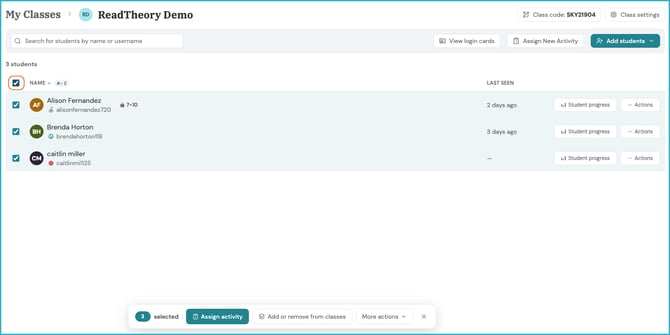
3. Select **More Actions**. 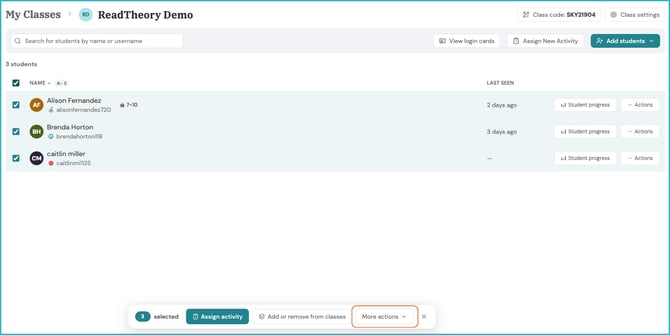
4. Select **Reset Student Progress**. .png?width=670&height=335&name=reset%20student%20progress%20(1).png)
5. Select the option to reset Knowledge Points if you want them to fully restart at 0. Uncheck this box if you don't want their Knowledge Points reset.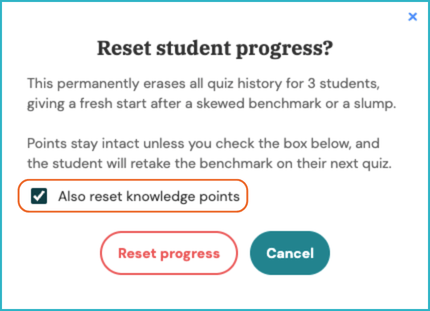
6. Select **Reset Progress** to finalize the process.
---
### Resetting Progress for Individual Students
This can be done from either the **Students** page or from within the **Class** page.
1. Select the checkbox(es) next to the student(s) you want to reset. 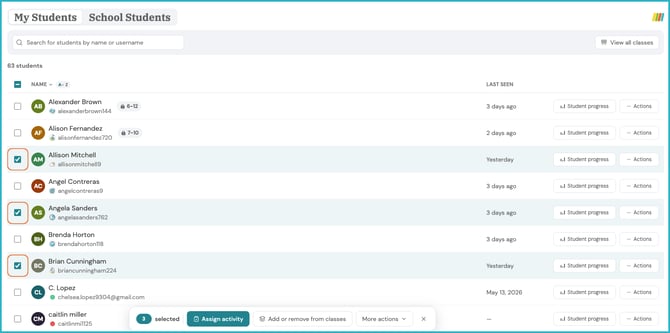
2. Click **More Actions**. .png?width=670&height=333&name=more%20actions%20(1).png)
3. Click **Reset Student Progress**. 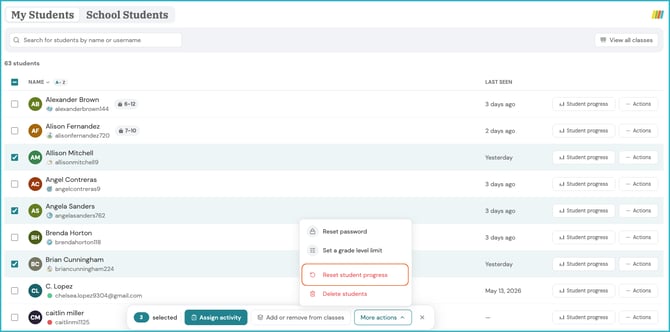
4. Select the option to reset Knowledge Points if you want them to fully restart at 0. Uncheck this box if you don't want their Knowledge Points reset. 
5. Select **Reset Progress** to finalize the process.
---
### Related Articles & Resources
[Removing Students and/or Classes](https://help.readtheory.org/removing-students-and/or-classes?hsLang=en)
[Account Deletion Request](https://help.readtheory.org/account-deletion-request?hsLang=en)
[How to View Student Progress](https://help.readtheory.org/progress-reports?hsLang=en)
[Locating and Analyzing Pretest Scores](https://help.readtheory.org/locating-and-analyzing-pretest-scores?hsLang=en)
---
Have questions? We're here to help. Reach out anytime at [support@readtheory.org](mailto:support@readtheory.org).
- [Getting Started](https://help.readtheory.org/getting-started?hsLang=en)
- [Using ReadTheory](https://help.readtheory.org/using-readtheory?hsLang=en)
- [Account & Access](https://help.readtheory.org/account-access?hsLang=en)
- [Premium, Billing & Subscriptions](https://help.readtheory.org/premium-billing-subscriptions?hsLang=en)
- [Troubleshooting](https://help.readtheory.org/troubleshooting?hsLang=en)
- [FAQs](https://help.readtheory.org/faqs?hsLang=en)
- [Reporting & Benchmarks](https://help.readtheory.org/reporting-benchmarks?hsLang=en)
- [Administrators](https://help.readtheory.org/administrators?hsLang=en)
[](https://readtheory.org/)
Copyright © 2026, ReadTheory LP